
Create a Wallet
Understand how a wallet account is created and prepare a secure backup before regular use.
Learn more →imtoken
A multi-chain wallet, blockchain network and Web3 knowledge hub from imtoken
Use one clear starting point to understand multi-chain assets, network selection, receiving and sending, DApp connections, approval management, network concepts, and wallet security. Every step emphasizes information users can verify and never asks for recovery secrets in a web form.
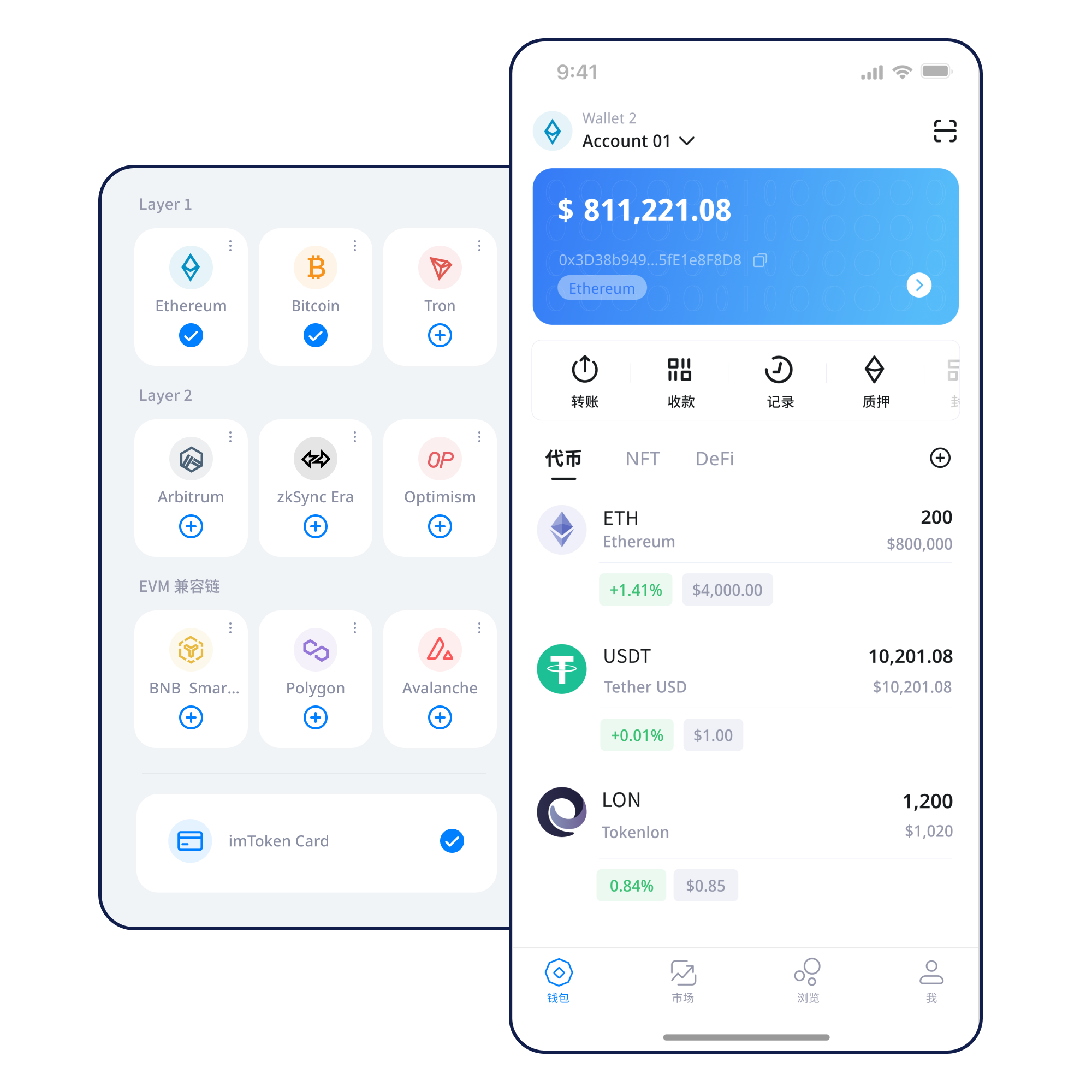
You do not need to learn every term first. Begin with the task at hand, then understand the address, network, fees, and security boundaries involved.
Understand how a wallet account is created and prepare a secure backup before regular use.
Learn more →Keep recovery information offline and avoid screenshots, broadly accessible cloud storage, or chat transfer.
Learn more →Confirm the receiving network and address before sharing the corresponding public address with a sender.
Learn more →Review address, network, asset, amount, and gas before confirming a transaction.
Learn more →Verify the domain and account request, then review signatures, transactions, and approvals separately.
Learn more →Understand multi-chain assets, mobile use, web connections, and security in their own contexts rather than treating every function as the same type of feature.
Different networks maintain separate ledgers, gas rules, and confirmation behavior. Review the asset, address, and transaction record together with the network.
For mobile asset review, network management, transaction history, and DApp request confirmation.
Build a complete review path around recipient address, network, amount, gas, and transaction hash.
Read the guide →Browser connections emphasize account requests, approval review, DApp access, and disconnecting sessions that are no longer needed.
Explore web connections →Recovery information stays under user control. Offline backup, signature review, approval management, and transaction checks form a long-term security practice.
Similar address formats do not mean the same network. Compare network types, execution environments, and confirmation behavior separately.
A unified interface can simplify management, while each underlying network keeps its own assets, fees, and confirmation rules.
Continue reading →Use nodes, blocks, transactions, and confirmations to understand how a public ledger records state.
Learn public chains →
Understand how addresses, gas, smart contracts, tokens, and approvals relate in execution.
Learn EVM →
Focus on the base-layer relationship, cross-layer transfers, bridging, arrival confirmation, and exit waiting.
Learn Layer 2 →
Each step includes a practical security checkpoint.
Use the download entry and verify that you are on the intended site before continuing.
Understand the difference between creation and import, and handle recovery information only in a trusted wallet environment.
Store recovery information offline and never disclose a private key to anyone.
Check the network name, gas asset, and recipient requirements instead of relying on similar address formats.
Review address, network, asset, and amount before sending; when receiving, share the address for the intended network.
Check the transaction hash and confirmation state, and periodically review DApp approvals that are no longer needed.
Web3
Connecting a wallet does not mean every signature request should be approved. Review each signature and approval independently.
Open the Web3 guide →Security
Seed phrases and private keys stay under user control. Official support will not ask for them, and recovery phrases or verification codes should never be sent to anyone. Check address, network, and amount before transfers, review DApp requests before signing, and remember that third-party contracts and services can carry risk.
Open Security Center →Academy
Addresses, seed phrases, private keys, networks, gas, transaction hashes, DApps, and approvals are not isolated terms. Together they explain who is acting, on which network, what is being authorized, and how the result is recorded.
Read the beginner guide →Understand how nodes, blocks, and confirmations describe transaction state.
NetworksEVM and smart contractsRelate addresses, gas, contracts, and tokens in the execution environment.
NetworksLayer 2 basicsUnderstand base-layer relationships, cross-layer movement, and waiting periods.
Web3DApp approvalsReview approval targets, allowances, and persistent permissions.
SecurityWallet securityBuild habits for recovery information, devices, and transaction checks.
AcademyBlockchain glossaryConnect common terms to one real-world usage path.
Staking content focuses on mechanism and risk, without fixed-return, principal-guarantee, or risk-free claims.
Learn Ethereum PoS, validators, reward sources, network state, withdrawals, and exits. Rewards can change and exits can involve waiting periods.
Read staking basics →Validators can face network penalties, smart contracts and third-party services can carry risk, and digital asset prices can fluctuate. Participation should be based on individual circumstances.
Learn PoS & Validators →When a verified date is unavailable, no specific date is invented; the content itself remains the focus.
Asset and transaction review guidance is organized around addresses, networks, and transaction hashes so users can trace status step by step.
Before cross-network activity, re-check the target network, gas asset, and recipient address instead of assuming similar address formats share the same ledger.
If any page or person asks for a seed phrase, private key, recovery phrase, or verification code, stop and verify the source.
Web3 guidance separates connection, signatures, transactions, and approvals so each request can be reviewed on its own.
Ethereum staking and validator education now emphasizes exit waiting, network penalties, contract risk, and asset-price volatility.
Start with common questions about accounts, networks, transactions, and security.
A wallet address is a public on-chain identifier used to receive assets or identify an account. Before sending, verify that the recipient address matches the intended network.
Both can provide control or recovery capability. A seed phrase commonly derives multiple accounts, while a private key corresponds to a specific cryptographic key. Keep both private and never send them to anyone.
Networks maintain separate ledgers. Even when address formats look similar, balances, token contracts, and transaction history are recorded independently on each network.
Gas is a way to measure the computational or network resources used by an on-chain action. The resulting fee depends on network rules, transaction complexity, and current conditions.
A transaction hash is a key identifier for locating an on-chain transaction in the relevant block explorer and checking its status, block, and confirmations.
Once confirmed, a blockchain transaction generally cannot be reversed unilaterally by a wallet. Verify address, network, asset, and amount before sending.
A connection by itself generally is not a transfer, but a DApp may later request signatures, transactions, or token approvals. Review each request separately.
Open the imtoken download page to review the currently available download information before continuing.